How to Choose a Baby Monitor for Overnight Care
When the first long night hits, a baby monitor becomes the screen you check before deciding whether to walk in or wait one more minute. Night vision, alerts, viewing method, and privacy matter more than a long spec sheet once you’re half asleep. Below, we cover camera detail, alert tuning, local versus app viewing, nursery privacy, room layout, and how to choose between monitors for overnight care.
A baby monitor is an everyday caregiving tool, not a medical monitoring device, and it does not replace safe sleep practices, direct supervision, or guidance from a paediatrician.
Night vision should make your first check faster

Baby monitor night vision is the feature you notice when it fails. A blurry grey image may be fine for checking whether the crib is occupied, but in the middle of the night you often need more than that. Is the baby awake or only shifting? Did the pacifier land near the cheek or across the mattress? Are their eyes open, or are you staring at shadows?
A decent camera should make those checks quick without sending you into the room for every sound. The image does not need to be perfect. It needs to show body position, facial direction, and small movement clearly enough that you can wait out a grunt or two.
Overnight, you mainly need night vision that lets you read the crib at a glance.
- Clear crib detail in a dark room
- Enough zoom to check face and position without entering
- Pan and tilt if the camera cannot be mounted straight over the sleep space
- A screen that is readable at night without feeling harsh
Where you place the baby monitor camera matters as much as resolution when the lens sits farther from the crib. A small nursery with a close shelf mount may not need the same detail as a larger room where the camera is across the wall. Picture where the camera will sit before you buy, not just the numbers on the box.
Baby monitor alerts should reduce noise fatigue
The worst overnight monitor is not always the one that misses sound. Sometimes it is the one that reports everything. White noise, a door closing down the hall, a dog tag, the heater clicking on, a sleepy grunt, another sleepy grunt. After a few nights, you either stop trusting the alerts or sleep badly because every small sound feels urgent.
Not every crib sound needs a push alert. A sleeping baby may wiggle, sigh, breathe unevenly at times, and briefly fuss before settling again. Higher sensitivity can mean more alerts, not necessarily better ones.
Most families only need a handful of alert types.
| Alert type | Overnight value | What to avoid |
| Cry detection | Helps separate distress from ordinary room sound | Alerts that trigger on every small noise |
| Loud sound alerts | Catches sudden disruptions | Sensitivity set so high it wakes you constantly |
| Room temperature | Helps flag a room that drifts too warm or cold | Treating the number as a medical reading |
| Motion or movement alerts | Useful for some rooms and stages | Too many alerts once the baby is older and active |
Every nursery sounds different. A city apartment, a room with white noise, and a quiet suburban bedroom need different thresholds, and the right setup may take a few nights of adjustment. Once you know which alert types you will actually use, you can compare cry, sound, and temperature options among eufy baby monitors.
Local and app viewing solve different night needs
A parent screen on the nightstand and an app on your phone solve different problems. That choice usually matters more overnight than it does during setup.
Local monitor mode
A local parent screen is often the easiest option for overnight care. It can sit on the nightstand, wake quickly, and keep the phone out of the routine. If you’re trying not to check work messages in the middle of the night, that separation matters. A local connection can also keep monitoring going when home internet is down or the phone is charging in another room.
App viewing
App access solves a different problem. It helps when you work late, travel, or want to check in during a caregiver handoff. It can also be handy in larger homes where the parent screen is not always nearby.
Hybrid viewing
You may want a parent unit on the nightstand most nights, and app access only when someone travels or a sitter takes over. Hybrid setups cover that split. A monitor that supports local viewing with or without WiFi lets you switch how you connect instead of locking into one method for every scenario.
You may reach for the parent’s screen most nights, or open the app more often. Either way, match the setup to ordinary nights, not occasional travel or sitter handoffs.
Privacy controls in the nursery
A nursery camera sees private moments. Late-night feedings, diaper changes, exhausted rocking, early morning wakeups, and the daily mess of family life all pass through that lens. WiFi settings, app access, and recording rules are part of the same setup.
Before you choose a monitor, three things are worth checking.
- Whether the camera can work without WiFi
- Whether app access can be turned off when it is not needed
- How video and recordings are protected
Some households keep app viewing on all the time. Others turn it on only for travel or when a sitter is watching the baby. Local viewing overnight keeps the nursery feed on the parent screen until you choose to connect through WiFi.
Privacy controls only help when you can find them quickly. A WiFi or app-access switch buried five menus deep is hard to use once the baby is already asleep.
How your home layout affects monitor choice

Where the crib sits, how far your bedroom is, and whether two children share one room all change what you need from a monitor. The same model can work well in a small apartment and start to feel limited in a two-story house with the crib across the room.
In a compact apartment, the camera often sits close to the crib, so extreme zoom may not matter much. Pan and tilt still help if the crib moves or the mount cannot sit directly overhead.
In a two-story home, you may be checking from a bedroom on another floor. Night vision, zoom, and a parent screen that wakes without lag usually matter more than extra alerts or app features.
A shared room with two children usually needs split-screen viewing or enough pan range to cover both sleep spaces without moving the camera every night.
A larger nursery, or a crib tucked into a corner, puts more weight on resolution and zoom. Pan and tilt also help when you reposition the crib during the first year.
Before you compare models, note the view you open most often at night and what still sends you into the room.
eufy Baby Monitor E21 vs E20 for overnight care
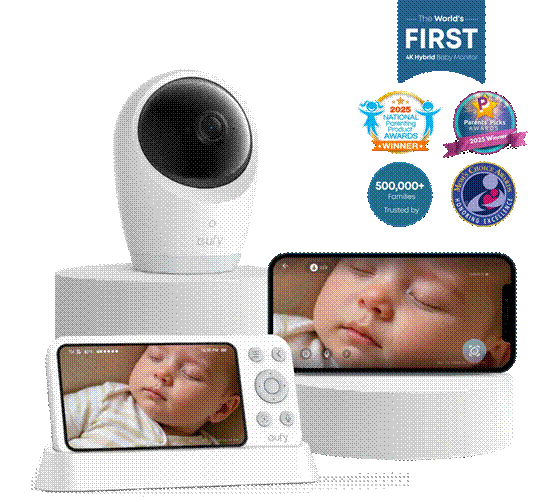
The sections above cover what matters most during overnight monitoring. If you are deciding between the eufy Baby Monitor E21 at $259.99 and eufy Baby Monitor E20 at $199.99, the main differences come down to 4K UHD and 8x zoom versus 2K HD and 4x zoom, and whether E21’s portable charging base for the parent display is worth the extra cost.
E21 and E20 share the same overnight basics. Both include parent display and app viewing, cry and loud sound alerts, room temperature readings, pan-and-tilt, split-screen, a WiFi switch for local-only mode, built-in camera batteries, and active noise reduction listed at 20 dB.
In the setups above, the eufy Baby Monitor E21 is the stronger fit. In a larger nursery, across the room from the crib, or when two children share one sleep space, you often need one glance to tell whether the baby is awake, settling, or only shifting. With 4K UHD and 8x zoom, you can check for night wakings or a lost pacifier from farther away, with enough facial detail to tell a real wake-up from light sleep before you open the door. Plus, the portable charging base keeps your monitor powered for extended use.
The eufy Baby Monitor E20 covers the same overnight routine at a lower price. When the camera sits only a few feet from the crib, 2K HD and 4x zoom are often enough to check for night wakings or a lost pacifier before you open the door. In a compact nursery with a fixed camera position, that is usually all you need from a nightly monitor.
If you still cannot tell from a distance, or you need the parent display to last longer through the night, E21 is the stronger pick. If the crib stays close and the picture already answers your usual overnight questions, E20 is enough.
eufy Baby Monitor E21
Conclusion
A baby monitor earns its place on the nightstand when it cuts guesswork without waking you up more often. Clear night vision, tuned alerts, and the right viewing setup should match how you check at night and what you need for privacy. Choose E21 when distance checks need more detail or you want the portable charging base for the parent display. Choose E20 when the crib stays close and the closer view is already enough. It will not parent for you, but it can make those after-bedtime checks easier to get right.
Pin It!